Showing posts with label background effects. Show all posts

Friday, 4 September 2015

Wk36 - Anything Goes/Backgrounds - Colouring Challenge at Graph'It markers with Cult Pens & Stamping Boutique

Hello Colouring Fans! Welcome back to another new week at Graph'It Colouring Challenge!
This week we are thrilled to be sponsored by the fabulous

http://www.thestampingboutique.com/

Make sure you pop by and have a snoop in the lovely Stamping Boutique digi store and grab yourselves some great digis!

This is the 2nd week of our challenge 

ANYTHING GOES/BACKGROUNDS

We would love you to show us some unusual backgrounds you've created for your images but we know this is not something everyone does all the time so if not - then Anything Goes!
You have until 11th September to enter the challenge and winners will be announced the following week.

We have some great prizes for you this week! 
PRIZE 1: 2 fabulous digis from the 

but, If you use a Stamping Boutique image for your entry you can win an extra digi from the Sponsors store!
TO WIN: - random winner from the Design Team's Top 3 favourites, chosen by random.org

PRIZE 2: 
£10 voucher for Graph'It
Kindly donated and sponsored by the amazing store 
Cult Pens have a fantastic Graph'It Promotion on at the moment HERE so head over there and grab some bargains - you can get a FREE tutorial DVD!!
TO WIN: You must be in the UK and a random winner will be chosen by Random.org - please add (UK) to your name on your challenge entry.

You can see the winners of our last challenge at the end of this post but in the meantime let's see what the team have made for you!...

Scatty Jan  Wow just loved making my card, I added in a brickwork background and the fishes using some altered stencils from my portrait . I adored the colour palette , and although the card took me some time I really enjoyed making it, I think I shall be using  backgrounds more often. I used the lovely image Princess Jennifer Latte Bubble Bath

Graph It Markers used
Skin 3120, 4135, 4145, 4125, 4150
Hair 3125, 3245, 1210, 3170
Bricks 7105, 7110, 7109 Blender pen
Fish/Towel 7220, 7240
Pinks 5110, 5115, 5120
Bath 7130 ,7122


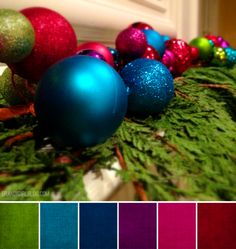
Cara......I enjoyed the challenge of creating a background for my image and while it didn't quite go to plan - I still had fun trying! I layered lots of blue shades to create a winter sky and added glitter and White Shake pen for sparkle and snow. I used the image Princess Jennifer Latte Decorating the Tree.
Image result for christmas colour palette 


Graph'it Markers Used:
Skin: 3105, 4155, 4115, 4135
Hair: 3190,3170,3150
Red: 5250, 5220, 3120
Green: 9107, 7220, 8190, 8160,8140
Background: Blue Greys

Nikky...I got so carried away with the background technique I did with the acetate last week I made 2 at the same time. I used the image Princess Jennifer Latte Happy Birthday to me from our fab sponsor...
 If you want to know how I made the background check back at last week's post - the technique is exactly the same....

I added plenty of shading behind and under the Chaise Longue, I really wanted it to look like it was up against a wall and 3 dimensional...I think we often under estimate the importance of greys and shadows and lighting. I was really chuffed with how this turned out the pink looks quite velvety i think which is exactly what I wanted.
Colours: Sofa: 5125, 5130, 5160 with lots of greys added for shadow.
Shadow greys: 9400,9402,9404,9406, 9408, 9909
Background: 6185, 5160, 2150, 1180
Mix'it fluid

Kevin I had a lot of Fun playing with the background of this image called  Princess Jennifer Latte Bubble Bath.....
Graph'It Markers Used
Skin 4105.4155.4170.4175
Hair 3245.3250.1280
Bath 9500.9501.9503
Bubbles 7101.7105 & silver glitter pen
Background 6130.6140.6110.5115.5110 & mix it fluid

What great background ideas - we all had so much fun trying these techniques out, it's so easy to forget backgrounds and leave it all white and boring so have a go!

OK, onto our challenge winners from last time which was our Colour Palette with Kenny K challenge on Week 34....

PRIZE 1: $20 gift certificate to Kenny K's amazing store
TO WIN: - random winner chosen by random.org
#28 Cr8iveCIndy - well done! Email us here quoting ref: GIw361001 to claim please!

PRIZE 2: Pack of 12 Graph'It Markers
Winner = #21 N-Eva - well done! *claimed*

PRIZE 3: Pack of 12 Graph'It Markers
Winner: #2 Zoechaos
Email us here quoting ref: GIw361002 to claim please!

So don't forget....


This is the 2nd week of our challenge 

ANYTHING GOES/BACKGROUNDS

We would love you to show us some unusual backgrounds you've created for your images but we know this is not something everyone does all the time so if not - then Anything Goes!
You have until 11th September to enter the challenge and winners will be announced the following week.


Friday, 28 August 2015

Wk 35 - Anything Goes/Backgrounds - Colouring Challenge at Graph'It markers sponsored by Stamping Boutique

Hello Colouring Fans! Welcome back to another new week at Graph'It Colouring Challenge!
This week we are thrilled to be sponsored by the fabulous

http://www.thestampingboutique.com/

Make sure you pop by and have a snoop in the lovely Stamping Boutique digi store and grab yourselves some great digis!

This week our challenge for you is
ANYTHING GOES/
BACKGROUNDS
We would love you to show us some unusual backgrounds you've created for your images but we know this is not something everyone does all the time so if not - then Anything Goes!
You have until 11th September to enter the challenge and winners will be announced the following week.
We have some great prizes for you this week! 
PRIZE 1: 2 fabulous digis from the Stamping Boutique - but, If you use a Stamping Boutique image for your entry you can win an extra digi from the Sponsors store!
TO WIN: - random winner from the Design Team's Top 3 favourites, chosen by random.org

PRIZE 2: Pack of Graph'It Markers
TO WIN: You must be in the UK and a random winner will be chosen by Random.org - please add (UK) to your name on your challenge entry.


Before we get to the inspiration we are excited to announce that we have yet another new stockist for Graph'It, so you can now purchase your markers from 
CULT PENS who also ship International so if you're overseas it's a bonus! 
You can also grab an awesome deal of buy 3 GET ONE FREE
over at Cult Pens right now so have a look Here
You can also purchase Graph'It markers through good Art and Craft stores across the UK, France and Europe...

We are also looking for a couple of Guest designers to join us here at Graph'It so if you love your Graph'It markers and would love to join in with us simply add GDT after your name when you enter on Mr Linky!
So let's get to the inspiration....

Yvonne - Hi there everyone! I got to play with Princess Jennifer Latte Bubble Bath.  Now we were challenged to make interesting backgrounds so I picked this for my colour palette:
I attacked my poor image and cut out the inner frame and round the image itself. I then scribbled some markers onto acetate, spritzed with some Mix It Fluid, swirled it around and pressed the card onto it.
The markers used are as follows:
Skin: 4105, 4125, 3110
Hair: 3105, 3110, 3160
Bath: 7215, 7130, 7170, 6130, 6140
 Towel & Headband: 6130, 6140
Latte: 9102, 9100, 9500, 9501 blender
Bubbles: 9501 & blender
Background: 6130, 7125, 7115, 7170 Mix It Fluid

Caroline...As we were challenged to make an interesting background I was a bit worried as I hadn't really done this before so this was really new for me... but once i got started really enjoyed the challenge.  I used Princess Jennifer Latte Decorating the tree....this was my colour palette...


Graph'It colours used: background colours 7185 ,7175, 7165, 7150, 7145 , snow 9100, 9110 and blender pen, tree 8270, 8250  8220 ,5210 5245, 5150, 5245, 7250, 7220, 6130, 6120
face 4150 ,4120, hair 1270 , 1130, box 3140 , 3125 latte 1110, 1130
White Graph'It Shake marker for stars

Nikky...I didnt follow a colour palette this week, I kind of forgot if I'm honest haha! I was playing around with a few colours and came up with this cool background effect which I have fallen a little in love with. If you want to know how I did it you can check it out below for more details, it's VERY easy when you know how!  I used the same image as Caroline Princess Jennifer Latte Decorating the tree....
I love how when you just play around with different things you discover the new and awesome stuff and then wonder why you never did that before!
In my excitement I forgot to write down the colours as I was creating but to be honest I didnt use that many, but from memory they are
Background: 7290, 7280, 6140, 2150, 1180
Tree - 7290, 7280, 6140 plus 8280 over the top which made it go this lush green colour
Girl - 4145, 3105 skin, hair 3125, 3180
Outfit - 5260, 5280
Graph'It Shake White marker
Mix'It Fluid

To create the background: 
1. Important! Do NOT colour your image first!
2. Take a piece of acetate and with any colour, lay it over the image and then roughly trace around the outline of the tree and girl, leaving plenty of white space from your outline to the outline of the image. Turn over the acetate. This is important! If you don't, you will end up with your image back to front!
On a piece of scrap paper, lay the acetate with the outline side down away from you and then apply colour to the acetate, just applying colour here and there randomly with the chisel end, but keep an eye on your image design and follow your sketched outline and roughly where you would want the colour to be. Try not to muddy the colours too much, you want definition, especially if you want to create a glow. So as an example, with mine I did a yellow outline around the image and added the blues further towards the edges.
Now take the Mix'It fluid spray and lightly spray onto the acetate from about 6" away - all the colour will retreat into tiny bubbles like oil on water. Next, spray Mix'It quite heavily onto your uncoloured image to really wet the paper - the wetter it is the better, but play around because you will get different effects depending on what you do and how wet the paper is. WORK QUICKLY so the Mix'It fluid doesnt evaporate too fast.
3. Once the paper is wet (a couple of sprays should do it but you need to work quite quickly), lightly spray the acetate again, quickly turn over and apply it over the top of your image, aligning it to the image. Squidge and smooth it around so you can see the colour transfer and move on the paper, then remove it and see how you did! You will have loads of colour still left on the acetate so you can keep spraying and applying it to transfer more colour and fill any gaps as you wish. If you like, spritz again on the paper as well - the more wet the paper the more it will bleed so it's worth practicing to get a feel for it. You can still use your blender marker to push the colour around or apply other colours over the top with your markers if you want to - the choice really is yours as to what you want to achieve and what you're happy with.
Play around - as you can do this BEFORE you colour your image it doesn't matter if you get bleeding or it doesnt work out - just start again or keep going till you're happy with it! 

It's seriously addictive! Once you're happy with your results for the background then colour in the rest of your image - don't forget if you get any bleeding across the image you can push the colour back out again because GI's will move - I got quite a bit of bleeding on the fur areas of her outfit so I just used my blender to push back and on the tree I moved one colour out with another on the baubles so it didn't look a mess. Easy peasy and a great technique for loads of different things!

Claire C I've used this supercute image Princess Jennifer Latte Decorating the tree and added a stripey wallpaper background using my Graph'It markers.


Colours used: Skin: 3105,44125,150,4147
Hair: 3245,1230,1210
Reds: 5245,5215,5210
Greens: 8280,8260,8250,8230
Background: 7110, plus 9501
Baubles, 1180, 2150, 6170, 5245, 7130
I've also used Graph'It Shake pens in Gold and Silver, Mix It fluid and palette


Stunning makes from the team this week and we hope we inspired you to make some great background effects for your images too - go on, give it a try, banish those white spaces!

We'll see you again next week with last time's winners and more inspiration for you, can't wait to see what you make for us!
Mister Linky's Magical Widgets -- Thumb-Linky widget will appear right here!
This preview will disappear when the widget is displayed on your site.
If this widget does not appear, click here to display it.

Friday, 24 October 2014

wk 43... Extra FX Inspiration - Graph'It Colouring Crazy Challenge

Welcome back to another super Graph'It colouring treat!

Our challenge for you again this week is

Extra FX
and this is our 2nd week of this challenge so you can ENTER HERE

This challenge basically translates as some extra little colouring effects we want you to show us! This can be spotty effects, textures, backgrounds, fancy schmancy - the result is up to you! 

You have until Oct 31st at noon GMT to enter and you can use any brand of alcohol marker to enter - our random winner will receive a pack of Graph'Its and the DT will choose their Top 3!

You can see the winners of our last challenge at the bottom of this post but let's see what the team have made this week!

Nikky...I love making backgrounds and little scenes for my characters when I colour, it can really lift a project and because it's something you do yourself it makes your character or image totally unique which is just fab! 
I decided to actually go really easy peasy but show you a cool background which can really change your images quite dramatically and this is my new fave at the mo...just add colours onto the Mix'It palette and pick up the colour with a blender brush and apply, working from a smallish dot and then extending the colour outwards as you work in a circle...you might find it looks a little bleachy and mottled but once you've blended the edges of the circles to make them really soft, go back and add more colour into the centre and it will look perfect! Depending on what colours you use and how daring you want to be is up to you, have a play and experiment! I used this Octavia image which you can get here.


Skin, 4125, 4150, 3120
Hair 5115, 5135, 5140, 5180
Dress: 5135
Background: 5115, 7130, 7110, 4145, 4147, 5125, 7210, 6130  & Silver glitter pen.

I really enjoyed this challenge I had such fun making my background, The image I have used is from Polkadoodles Festive Hollybobs Cd Rom I printed the image twice so that I could cut one out to use as a mask, I created my background by roughly colouring the the whole area with 9101,9102 & 9500, I then masked my image and sprayed some Mix it fluid, I then used the blender pen to remove some colour and give a snowing effect, I also added some Silver glitter pen spots, after it dried off I coloured the image and then added a little frantage to bring the snow effect over my image. I hope you like it.
Skin, 4150..4155..4170..4180
Clothing,1230..1210..1270..1280..2105.
Fence,3110..3120..3170.
Background,9101..9102..9500 Blender..Mix It Fluid & Silver glitter pen.

Wendy -  For my background I've used this lovely image called 'Octavia thinking' available from Polkadoodles.  I decided to put her in a meadow of flowers.


Graph it colours used:-
Background - 9101  9201  6110  6120  6130  6170  8250  8280  5115  Blender
Skin - 4115  4145  4125  4150  4155  4135
Hair - 4110  3210  3255  3245  3290  1150  1250
Dress - 4120  4145  4175  5215


Cara I decided to colour up a sunset for a background to my little Mr Foxy image.  I used lots of different colours and just layers up the background, finally I went over with the blender pen to soften the edges of the clouds.

Graph'it colours used:
Sky: 2180,2170,2150,2105,1180 neutral greys
Mr Foxy: 3190,3180,3170,3130,2180,2170


Lizzy-  For my background I wanted to make an ominous looking sky.  I made a stencil with different sized circle punches for the clouds and then added in the road and ground below.


Graph'it color combos used:
skin: 4125, 4150, 4170, 3125/ 4145, 4135, cheeks
hair: 1210, 1230, 1250, 3125
shirt: 6140 mixed with 9407, 9404
boots: 3125, 3120, 3110
backpack and leggings: 9407, 9405, 9404, 9402
sleepingbag, shirt, eyes: 9201, 8110, 8120, 8280
ground: 3210, 3245, 3250, blender
clouds: 9100, 9101, 6110, 9104

Janet I've gone for something really different and made all my own backgrounds using Graph'it Markers on metal and parchment paper and then embossing and die cutting them.


one a man's version


and a girly version
I've used a mixed variety of colours that just go together and the blending fluid spray.


Such fabulous ideas on how to create some great effects again this week! 

Don't forget you don't have to use Graph'It markers to enter and you can win some goodies!
ENTER HERE


Let's get to the winners of our last challenge which was Autumn Colours!

Random.org selected:   No 3 Coldwaters 

as our goodie prize winner - well done!
email us here to claim your prize quoting code
GIw43001w40 to claim your prize! Whoop Whoop!

The Design Team's Top 3 favourites are:
32 Asha
5 Susan
31 Angelique

There were so many great entries this week it took us aggges to decide - so a huge well done everyone and thankyou for entering!

We'll be back next week to see you all with some fab news!
See you there! 

Friday, 20 September 2013

Wk13: Graph'It challenge...No Characters - colour an Accessory!

Hey, it's Friday! Hello everyone and welcome to another challenge!

Now, before we even get started we have some great news for you all - from today's challenge onwards we shall be picking a RANDOM WINNER each week to get one of our great prizes! WOOHOO!! We're doing this as a massive thanks to you all for entering each week and we think it's much fairer that everyone gets an equal chance to win some lovely goodies, no matter how great your technique for colouring is! So from now on, if you enter then you're in the draw! We will still choose our favourite top 3 as well and they will receive a little prize too.

So our challenge for the Design Team this week was....are you ready for it?....
NO CHARACTERS!

Now, this one is a little tough, so we are bending the rules a little for you at home - you CAN use a Character but we also want you to colour in something extra too - for example, a house, a flower, a butterfly, a wall, pumpkin, cat, dog, etc etc etc....we want you to colour an accessory! 
The winner of this challenge will win a set of Graph'It markers and our Top 3 faves will get a great digi download, so get your entries in by Sunday 29th!

So onto our winners from week 11 which was to show us your background techniques...we had quite a few entries for this and there were some great ideas so a huge well done to everyone! Our winners are:
2. Sally
3.  Lucy
Big congratulations everyone! Stephanie you win a set of 6 Graph'It Xmas colours so please email Nikky your snail mail address to claim your prize.

Ok, let's head over to see what the Uber talented team have for you today to inspire....


Faye
This is a tough Challenge, but it can also be a lot of fun to make something other than a character the focus of your card. Originally, I was just going to use the Graffiti to make a party invite, but I kind of got carried away and coloured up a whole wall too...
Markers Used...
Wall; 4110, 3210, 3170, 3180, 3190, Whites; 9500, 9100, Turquoise; 7140, 7145, 7160, Yellow; 1150, 1250, Green; 8260, 8270, 7290, Orange; 2150, 2180

Karen
Yes, I also found it a bit of a challenge but fun too, I must have had food on the brain when I was deciding what to do!  I found this yummy Christmas Pudding on the PolkaDoodles 'Here Comes Christmas ' CD.
Graph'It Colours
White - 9100 9101 9501
Pudding 3125 3140 5150 3160
Holly 5245 3170 8270 8280

Suzi
What a fun challenge, I decided to may a boy's card, so used the cute truck digis on the Pretty Tuff CD from Polkadoodles for my bright and cheery card.
Graph'It Colours used;
1170, 1180, 2150, 2160, 5220, 5240, 6110, 6140, 6180, 6190, 7125, 7130, 9103, 9105, 9108.

Claire
This week's theme was defnitely a challenge but I decided to have a go at colouring glass and bottled (ouch bad pun lol) out of colouring the wallpaper through the glass so I tried to add some shadow and  depth around the bottom of the glass to make it look like it was standing well away from the wall.
I used neutral greys for the glass and added a little 7210 for the glass,, I also used the neutral greys for the shadows

So there is our inspiration from the fabulously talented Graph'It team this week!...

You have until  Sunday 29th September at noon GMT to enter below by adding your creation to Mr Linky below - don't forget you have the chance to win a fabulous prize! 
The winner of this challenge will be announced on Friday 5th October here on this blog. 

Please check our rules for all entries: 
1. All entries MUST follow the challenge theme. 2. Please link your blog post and not your blog address with the linky tool - this saves us from searching your blog for your entry.  3. No back-linking to previous posts - these will be disregarded from our voting.4. Please ensure you follow the challenge theme!

Mister Linky's Magical Widgets -- Thumb-Linky widget will appear right here!
This preview will disappear when the widget is displayed on your site.
For best results, use HTML mode to edit this section of the post.

Friday, 6 September 2013

Background Effects with Graph'It Markers...Week 11

Hi Graph'It fans - it's Friday challenge time! 


So let's get to the challenge! Last week we challenged you to colour Reds and Greens - but this week we want you to show us your....

Background Effects

You can use ANY brand of alcohol marker to enter our challenges!

Before we get to this week's inspiration and prizes, it's time to announce the winner of last week's challenge. We're so pleased to announce that our Top 2 entries are:
2.  Laine

We loved all your work and congratulations to Lucy who won our fabulous prize of 6 Graph'It Skintones, a Mix'It palette and Mix'It Fluid!! Laine has also won this week and will be receiving a 3pack of Graph'It Romance colours too! Well done! Please email Nikky here to claim your prize and please grab your winners blinkies from the sidebar.

The winner of this week's challenge will win a fantastic prize of 6 Graph'It Xmas Colours - perfect for this time of year!


So let's get to the great team inspiration this week...Remember to join our Facebook group too, Graph'It Markers UK, where we have daily inspiration and share some of our favourite makes & hints and tips every day, it's a great place to be!


I've used an image from the fab Polkadoodles CD 'Here Comes Christmas' , coloured it with my Graph'Its and overlaid it with acetate. My background was actually created on the acetate by colouring with 7130 for the sky and 1280 for the light from the lamp, I sprayed with Mix'It spray to create the snowy effect ... easy!

Colours used: 
Greens: 8120, 8110. Red: 3160, 5245, 5220
Blue: 7130,7125,7110,7105. Black: 9909, 9507, 9505, 9503
Skin: 4180, 4155, 4115, 4120

I also used an image from the PolkaDoodles CD 'Here Comes Christmas'. I wanted to create a winter sky so I used 3 different shades 7105 7110 9100 layered over each other and then used my Blender to bring them together and  lighten some areas, really easy and very effective I think!
Hair - 1210 1250 2120
Skin - 4120 4144 4170 5110
Skirt - 9100 9103 9104
Red - 4220 5245 3170
Brown - 9401 9403 9405
Other - 9501 9502

I love this image from the Polkadoodles BonBon Belles CD Rom, it just says summer to me. And, with all of the space around the toadstools and birdhouse, it works really well with the smooshy, dotty background I love to do with Graph'It Markers...
Colours...
 Background: 9100, 9102, 0000
Toadstool Stems: 3210, 4110
Toadstools: 3170, 5240
Birdhouse: 3245, 3250, 3255, 3190
Flowers 1110, 1150, 1250, 6140, 61807130, 7170

The only stamp used on my card is the sentiment, I played with my Graph'It Markers, Mix'It Fluid and a Stencil to create my background effect.
Colours;
5245, 9909 and Mix'It Fluid.

Nikky
I love thinking of different background effects I can do with my Graph'Its but this particular one is a very old favourite of mine...
I used the Premium Art Brands Snowy Cottage and Winter spruce stamps on this and created a sky and snowy scene. The snow is made using Mix'It fluid....this stuff is SO addictive, I find I just sit there trying to think of new ways to use it all the time! 
Colours:
sky/blues: 4120, 7220, 7240, 7250, 7260, 7270, 
Trees: 7290, 8280, 8260
Windows:1170, 2180


So there is our inspiration from the fabulously talented Graph'It team this week!...

You have until  Sunday 15th Sept at noon GMT to enter below by adding your creation to Mr Linky below - don't forget you have the chance to win a fabulous prize! The winner of this challenge will be announced on Friday 20th September here on this blog. 

Please check our rules for all entries: 
1. All entries MUST follow the challenge theme. 2. Please link your blog post and not your blog address with the linky tool - this saves us from searching your blog for your entry.  3. No back-linking to previous posts - these will be disregarded from our voting.
Mister Linky's Magical Widgets -- Thumb-Linky widget will appear right here!
This preview will disappear when the widget is displayed on your site.
For best results, use HTML mode to edit this section of the post.